
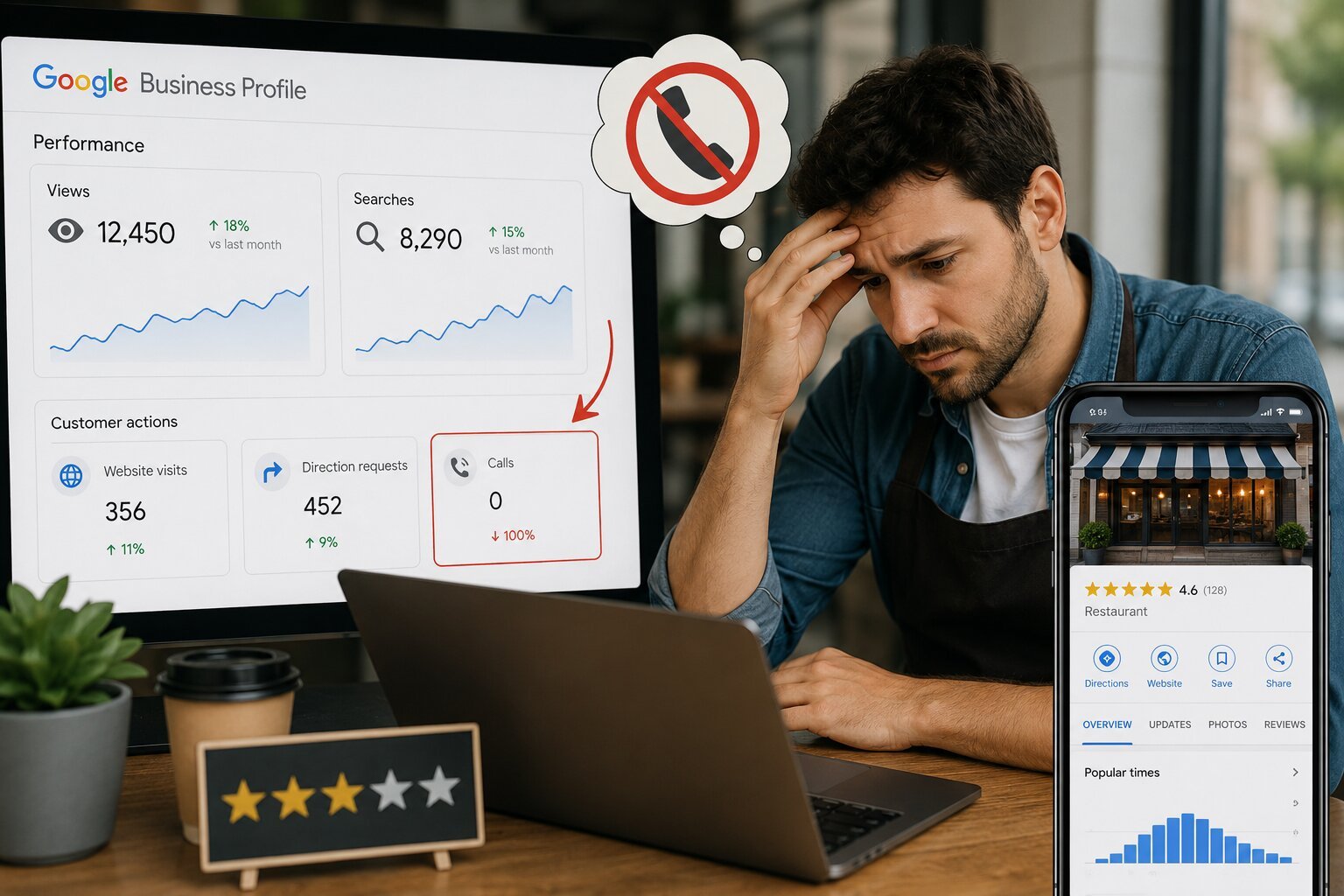
Your Google Business Profile (GBP) gets views but no calls when there’s a gap between visibility and conversion — people find your listing, but something stops them from tapping “Call.” The most common causes are: an inaccurate or hard-to-scan phone number, thin or outdated reviews, weak photos, a mismatched business category, missing hours or attributes, and a call-to-action that’s buried instead of prominent. Fix these six areas — number formatting, reviews, photos, category accuracy, completeness, and CTA visibility — and call volume typically improves within 2–4 weeks as Google’s algorithm and searchers both respond to the stronger profile.
If your Google Business Profile shows strong impressions but weak call volume, the problem is almost never “not enough visibility.” It’s a trust or friction problem at the exact moment someone is deciding whether to call. Google Business Profile insights track two separate things: how often you’re shown (views/impressions) and how often someone acts (calls, direction requests, website clicks, messages). A high view count with a low call count means your profile is winning the visibility game but losing the conversion game — usually because of missing information, unconvincing reviews, or a phone number that isn’t clickable or correct.
Key Takeaways
- Views and calls measure different things. Views = discovery. Calls = trust + intent + ease of action.
- Reviews are the single biggest lever. Profiles with 4.5+ average ratings and recent reviews (within 30–60 days) convert calls at meaningfully higher rates than profiles with stale or low review counts.
- Phone number formatting matters more than most owners realize. Non-primary or secondary numbers, inconsistent NAP (Name, Address, Phone) data across the web, or a number that differs from your website can suppress the call button’s prominence.
- Category and attribute mismatches quietly kill conversions. If your primary category doesn’t match what searchers are looking for, you get impressions for the wrong intent.
- Mobile experience is decisive. Most GBP calls originate on mobile, where the “Call” button either appears prominently or gets buried under “Directions” and “Website.”
- This is a fixable problem, not a visibility problem — so adding more SEO effort to increase views usually won’t fix a conversion issue.
Understanding the Difference: Views vs. Calls vs. Actions
Definitions
| Term | Definition |
|---|---|
| Views (Impressions) | The number of times your GBP listing appeared in Google Search or Maps, whether or not anyone interacted with it. |
| Calls | The number of times a user tapped the “Call” button on your profile. |
| Direction Requests | The number of times someone requested directions to your business. |
| Website Clicks | The number of times a user clicked through to your website from the profile. |
| Conversion Rate (GBP context) | Calls (or other actions) divided by total views — the percentage of people who saw your profile and took action. |
Why the Metrics Diverge
Google surfaces your profile based on relevance, proximity, and prominence signals — this is largely independent of whether your profile is persuasive. A profile can rank well (high views) while still failing to convert because ranking and conversion are governed by different signal sets: ranking cares about relevance and authority; conversion cares about trust, clarity, and ease of action.
Comparison Table: What Each Metric Tells You (and What to Fix)
| Signal | What It Means | Likely Fix |
|---|---|---|
| High views, low calls | Strong visibility, weak conversion | Improve reviews, photos, CTA prominence, phone accuracy |
| High views, high direction requests, low calls | People trust your location but not your phone experience | Check number formatting, hours accuracy, “closed” status errors |
| Low views overall | Discovery problem, not conversion problem | Standard local SEO: citations, category, keywords, backlinks |
| High views, high website clicks, low calls | Users prefer researching before calling | Ensure your website has clear, matching CTAs and click-to-call links |
| High calls, high missed-call rate | Conversion is working, operations isn’t | Staffing, call routing, or business hours mismatch |
The 6 Most Common Reasons for Views-Without-Calls
1. Phone Number Problems
What happens: Your listed number differs from your website or citations (NAP inconsistency), it’s a tracking number Google doesn’t fully trust yet, or it’s not formatted as a primary contact method.
Fix:
- Confirm the number on your GBP matches your website and major directories exactly.
- If using call tracking, use a static or Google-verified dynamic number — not one that changes so often it triggers inconsistency flags.
- Test the click-to-call button yourself on mobile.
2. Weak or Stale Reviews
What happens: Searchers use reviews as a trust filter before calling, especially for service businesses. A 3.8-star average or a review gap of 6+ months signals risk.
Fix:
- Set a goal of 3–5 new reviews per month, minimum.
- Respond to every review — Google’s own guidance and independent industry studies consistently link owner responses to higher trust signals.
- Address negative reviews publicly and professionally; unanswered complaints are more damaging than the complaint itself.
3. Weak Visual Trust Signals
What happens: Profiles with stock-like, outdated, or few photos underperform. Users scan photos as a proxy for legitimacy and quality before deciding to call.
Fix:
- Add real photos: team, storefront/location, work-in-progress, completed jobs.
- Upload new photos monthly — GBP favors “freshness” and recency signals in engagement.
- Avoid over-edited or generic imagery.
4. Category or Attribute Mismatch
What happens: If your primary GBP category is too broad (“Contractor”) or slightly wrong (“General Contractor” vs. “Roofing Contractor”), you attract views from the wrong search intent — people who see you but aren’t looking for what you actually offer.
Fix:
- Audit your primary and secondary categories against actual services.
- Add relevant attributes (e.g., “Identifies as women-owned,” “Online estimates,” “Free consultation”).
5. Incomplete or Inaccurate Profile Information
What happens: Missing hours, incorrect “temporarily closed” status, no service area listed, or an empty business description all add hesitation at the decision point.
Fix:
- Fill every available GBP field — profiles with complete information are shown by Google’s own guidance to be more likely to receive requests for directions and clicks to their websites.
- Double-check holiday hours and special hours quarterly.
6. Buried or Weak Call-to-Action
What happens: On mobile, “Call” competes with “Directions,” “Website,” and “Message.” If your profile doesn’t emphasize calling (e.g., no compelling first line in your business description, no “Call now” messaging enabled), users default to a lower-friction action.
Fix:
- Enable messaging as a backup for users who won’t call but will text.
- Use the business description’s first sentence to state exactly what you do and why to call now (e.g., “Same-day emergency plumbing — call for immediate availability”).
Step-by-Step: Diagnosing Your Own Profile
- Pull your GBP Insights (Performance) report for the last 90 days. Compare views, calls, direction requests, and website clicks side by side.
- Check your conversion rate. Divide calls by views. Under 1–2% for local service businesses is a signal something is off (benchmarks vary by industry, but this is a useful red flag threshold).
- Audit NAP consistency. Search your business name and confirm the phone number matches across your website, GBP, and top 5 directory citations (Yelp, BBB, Facebook, etc.).
- Review your last 10 reviews. Are they recent? Do you have unanswered negative reviews?
- View your profile as a mobile user. Search your business name from a phone and time how many taps it takes to reach “Call.”
- Check your primary category in GBP settings against your top 3 services.
- Compare photo upload dates. If your most recent photo is 6+ months old, that’s a freshness gap.
- Test your phone number by calling it yourself from the listing.
Real-World Example
A regional HVAC company had roughly 3,200 monthly GBP views but fewer than 15 calls — a 0.5% conversion rate, well below the 1–2% baseline typically expected for local service businesses. An audit found: a secondary/tracking number that didn’t match the website, a 4.1-star rating with no owner responses in 8 months, and only 3 total photos. After correcting NAP consistency, actively collecting and responding to reviews for 60 days, and adding 20+ recent photos, monthly calls increased into the 40–50 range — without any change in view count. This illustrates the core principle: the fix wasn’t more visibility, it was more trust.
Frequently Asked Questions
Why does my Google Business Profile show a lot of views but hardly any calls?
This usually means your profile is being found (good visibility/ranking) but isn’t convincing people to act once they see it. Common causes include weak reviews, an inconsistent or hard-to-tap phone number, thin photos, or a category mismatch.
What’s a good call-to-view ratio for a Google Business Profile?
There’s no official universal benchmark from Google, but many local SEO practitioners consider roughly 1–2% of views converting to calls a reasonable baseline for local service businesses, with higher-intent categories (like emergency services) often performing above that range.
Does Google Business Profile call tracking hurt my rankings?
Not inherently, but using a call-tracking number that’s inconsistent with your website and citations, or that changes frequently, can create NAP mismatches that dilute trust signals. Google-verified dynamic number insertion is generally safer than ad-hoc tracking numbers.
Why am I getting direction requests but not calls?
This often means people trust your location enough to visit but haven’t been convinced to call first — check whether your hours are accurate, your phone number is prominent, and your profile doesn’t say “Temporarily Closed” in error.
How long does it take to see more calls after optimizing my profile?
Most businesses see measurable changes in 2–4 weeks after improving reviews, photos, and profile completeness, though full effects can take up to 90 days as Google re-evaluates engagement signals.
Should I focus on getting more views or more calls first?
If you already have meaningful view volume, focus on conversion (reviews, photos, accuracy, CTA clarity) before investing further in visibility tactics like citation building or additional keywords — you’re leaving existing traffic on the table.
Does responding to reviews actually increase calls?
While Google doesn’t publish a direct ranking weight for review responses, businesses that respond consistently tend to see higher engagement, and responses give prospective customers additional trust signals when deciding whether to call.
Missing Questions Worth Addressing (Content Gap Opportunities)
- Does GBP messaging cannibalize calls, or add incremental conversions?
- How does service-area-business (no storefront) status affect call conversion differently than a physical location?
- What’s the impact of Google Guaranteed / LSA badges on call rates for eligible categories?
- How do multi-location businesses avoid cannibalizing calls between nearby profiles?
- Does the “Ask a question” Q&A feature affect trust and conversion?
Schema Markup Recommendations
For this article and related pages, the following structured data improves AI and search-engine parsing:
FAQPageschema — wrap the FAQ section for eligibility in Google’s FAQ rich results and to aid AI answer extraction.HowToschema — apply to the “Step-by-Step: Diagnosing Your Own Profile” section.Article/BlogPostingschema — includeauthor,datePublished,dateModified, andpublisherfields to strengthen E-E-A-T signals.LocalBusinessschema — on the business’s own site (not this article) to reinforce NAP consistency referenced here.DefinedTermschema — optional, for the definitions table (Views, Calls, Direction Requests, etc.).
Semantic Keywords & Related Entities
Google Business Profile, GBP insights, local SEO, click-to-call, NAP consistency, call tracking, Google Maps ranking, local pack, Google Local Services Ads, review velocity, star rating, business category optimization, mobile conversion rate, Google My Business (legacy term), local search intent, citation building, Google Guaranteed badge, direction requests, website click-through rate, business description optimization.




What do you think?
[…] Core Services: SEO, local SEO, Google Business Profile optimization […]
[…] Google Business Profile is usually the first thing a potential customer sees, especially for urgent searches where people […]
[…] Google Business Profile SEO […]
[…] Google Business Profile SEO […]
[…] Google Business Profile work […]
Comments are closed.