
This shift has pushed two strategies to the center of modern SEO: topic clusters and pillar pages. They’re often mentioned together, sometimes used interchangeably, but they’re not the same thing — and understanding the difference is key to building a content strategy that actually works in 2026.
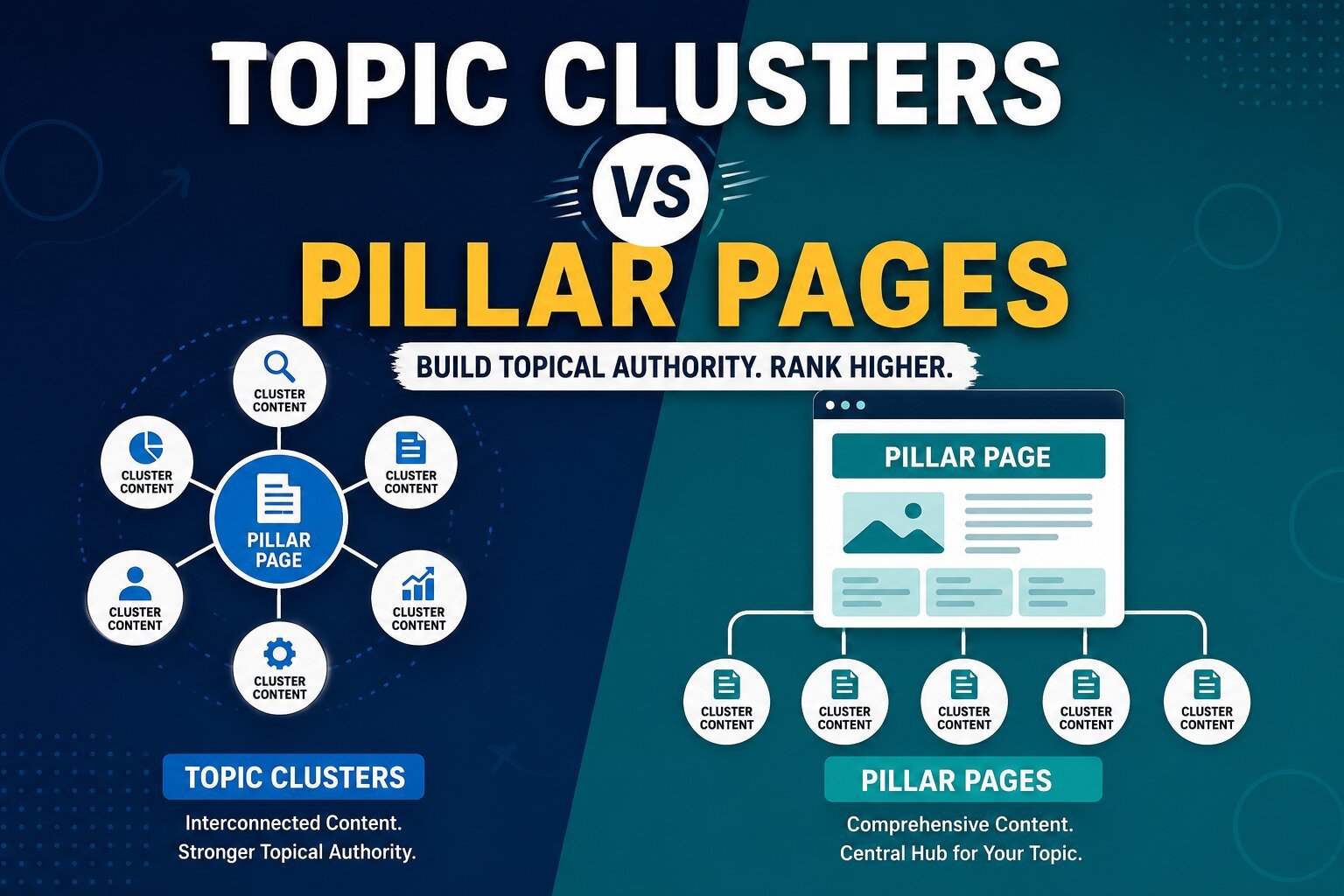
So, what are topic clusters? In short, they’re groups of interlinked articles that thoroughly cover a subject from multiple angles. What are pillar pages? They’re the central, comprehensive hub pages that organize and link out to those cluster articles. Together, they form the backbone of a modern SEO content strategy — but each plays a distinct role.
In this guide, we’ll break down exactly what each strategy is, how they differ, how they work together, and which one deserves your attention first in 2026.
What Is a Topic Cluster?
Definition
A topic cluster is a group of related content pieces, all connected through internal links, that together cover a broad subject in depth. Each piece in the cluster focuses on a specific subtopic, while collectively they demonstrate comprehensive expertise on the overarching theme.
How Topic Clusters Work
Instead of publishing random, disconnected blog posts, a topic cluster strategy organizes content around a central theme. Every article in the cluster links back to a central pillar page, and often links sideways to other related cluster articles. This creates a web of topical relevance that search engines can easily crawl and understand.
Structure of a Topic Cluster
A typical topic cluster includes:
- One pillar page — the broad, comprehensive overview of the topic
- Multiple cluster articles — each covering one specific subtopic in detail
- Internal links connecting cluster articles back to the pillar page (and often to each other)
For example, a topic cluster around “Email Marketing” might include cluster articles like “Email Segmentation Strategies,” “How to Write Subject Lines That Convert,” and “Best Times to Send Marketing Emails” — all linking back to a central “Email Marketing” pillar page.
Benefits of Topic Clusters
- Strengthens topical authority across an entire subject area
- Improves crawling and indexing by clearly mapping content relationships
- Reduces keyword cannibalization by giving each subtopic its own dedicated page
- Increases organic traffic by capturing many long-tail keyword variations
- Enhances user experience by guiding readers naturally between related resources
Example
A SaaS company selling project management software might build a topic cluster around “Remote Team Collaboration,” with cluster articles covering async communication, virtual meeting best practices, and remote onboarding — each supporting a central pillar page on the broader topic.
What Is a Pillar Page?
Definition
A pillar page is a long-form, comprehensive page that covers a broad topic in its entirety and serves as the central hub linking out to all related cluster content. It’s the anchor of the topic cluster model.
Purpose
The purpose of a pillar page is twofold: to give readers a complete overview of a topic, and to organize and connect deeper, more specific content. It answers the big-picture question while pointing users (and search engines) toward more detailed resources.
Structure
A well-built pillar page typically includes:
- A clear introduction defining the topic
- Organized H2/H3 sections covering major subtopics
- Links to each corresponding cluster article
- Summary tables, bullet points, and visuals for scannability
- A strong internal linking structure connecting it to the full cluster
Types of Pillar Pages
- 10x/Guide pillar pages — comprehensive, educational resources (e.g., “The Complete Guide to Content Marketing”)
- Product/Category pillar pages — hubs organized around a product or service category (e.g., “CRM Software: Everything You Need to Know”)
- Resource pillar pages — centralized hubs linking to tools, templates, or downloadable resources
Example
A healthcare website might build a pillar page titled “Understanding Type 2 Diabetes,” linking to cluster articles on diet, medication, exercise, and blood sugar monitoring — giving both patients and search engines a single, authoritative starting point.
Topic Clusters vs Pillar Pages: Key Differences
While they work together, topic clusters and pillar pages serve different functions. Here’s a side-by-side comparison:
| Feature | Topic Clusters | Pillar Pages |
|---|---|---|
| Purpose | Organize multiple related articles around a theme | Provide one comprehensive overview of a topic |
| Structure | A network of interlinked subtopic articles | A single, central hub page |
| Content Type | Multiple focused, in-depth articles | One broad, all-encompassing page |
| Internal Linking | Links between cluster articles and back to the pillar | Links outward to every cluster article |
| User Experience | Guides users through related, specific answers | Gives users a big-picture starting point |
| SEO Impact | Reduces cannibalization, boosts topical depth | Establishes a clear authority page for the topic |
| Ranking Potential | Captures many long-tail keywords across articles | Ranks for broad, high-volume head terms |
In short: topic clusters build breadth and depth, while pillar pages provide structure and a central authority point. Neither works as well without the other.
How Topic Clusters and Pillar Pages Work Together
Why They Are Not Competitors
It’s a mistake to think you need to choose between topic clusters and pillar pages. They’re not competing strategies — they’re two halves of the same system. A pillar page without cluster content is just a long article with no supporting depth. A topic cluster without a pillar page is a group of articles with no central organizing hub.
How They Support Each Other
The pillar page acts as the anchor, giving structure and context to the topic. The cluster articles add depth, targeting specific subtopics and long-tail queries the pillar page can’t cover in detail. Internal links tie everything together, helping both search engines and users navigate from broad concepts to specific answers — and back again.
The Content Hub Model (A Visual Explanation)
Picture a wheel:
                Cluster Article A
                        |
Cluster Article D — [ PILLAR PAGE ] — Cluster Article B
                        |
                Cluster Article C
The pillar page sits at the center, like the hub of a wheel. Each cluster article is a spoke, linking back to the hub and covering one specific piece of the broader topic. This structure is often called the content hub model, and it’s the foundation of a strong topical authority framework.
Topical Authority Framework
When you combine a pillar page with a well-developed topic cluster, you create a topical authority framework — a structured body of content that proves, both to readers and to search engines, that your site deeply understands a subject. This framework is exactly what modern algorithms and AI search tools look for when deciding which sources to trust and cite.
Benefits of Topic Clusters
- Improved rankings — Each cluster article can rank for its own specific keyword, expanding your visibility across many search queries.
- Better crawling — Search engine bots can more easily discover and index content through clear internal linking paths.
- Increased topical authority — Comprehensive subtopic coverage signals genuine expertise.
- Enhanced user experience — Readers can easily move between related, relevant articles.
- Higher organic traffic — Capturing multiple long-tail keywords adds up to significant traffic gains over time.
Benefits of Pillar Pages
- Better internal linking — Acts as a natural hub for distributing link equity across the cluster.
- Higher dwell time — Comprehensive content keeps visitors engaged and reading longer.
- Easier navigation — Gives users (and search engines) a clear starting point for exploring a topic.
- Stronger authority signals — Positions your site as the definitive resource on a subject.
- Increased conversions — A well-structured pillar page can guide readers toward relevant products, services, or calls-to-action along their research journey.
Which Strategy Is Better for SEO in 2026?
The honest answer: it’s not about choosing one over the other — it’s about understanding when each carries more weight.
Google’s Understanding of Entities and Semantic Search
Google no longer relies solely on exact-match keywords. Its algorithms use semantic search and entity recognition — powered in part by the Knowledge Graph — to understand the meaning behind queries and the relationships between concepts. This means your content needs to demonstrate topical relevance across an entire subject, not just optimize for isolated phrases.
AI Overviews and User Intent
AI Overviews and generative search tools synthesize answers from multiple sources, favoring content that thoroughly satisfies search intent. A single pillar page can capture broad, informational intent, while cluster articles capture more specific, often transactional or investigative intent.
The Balanced Answer
- If your site is new or your topical authority is thin, start with a pillar page to establish a clear, central resource.
- If you already have scattered content on a subject, start by building topic clusters around your existing pages, then unify them under a new or existing pillar page.
- For long-term SEO success in 2026, you need both — a strong pillar page for authority and structure, supported by a growing cluster for depth and long-tail visibility.
How Topic Clusters Help You Rank in AI Search
AI search tools are reshaping how content gets discovered — and topic clusters are particularly well-suited to this new landscape.
- ChatGPT citations — ChatGPT favors well-structured, topically comprehensive sources when generating and citing answers.
- Google AI Overviews — These features pull from content that thoroughly addresses a query, often synthesizing information from multiple related pages on the same site.
- Gemini — Google’s AI model leans on entity relationships and topical depth, both of which are strengthened by a well-built cluster.
- Perplexity — This answer engine prioritizes sources with clear, well-organized, fact-based content — exactly what strong cluster articles provide.
- Answer Engine Optimization (AEO) — Structuring your cluster content around direct, well-organized answers to specific questions increases your chances of being surfaced in AI-generated responses.
Because topic clusters cover a subject from many angles, they multiply your chances of matching the exact phrasing and intent behind AI-generated queries.
Common Mistakes to Avoid
- Creating orphan pages — Publishing content with no internal links connecting it to a pillar page or cluster wastes its SEO potential.
- Weak internal linking — Failing to consistently link cluster articles back to the pillar page weakens the entire structure.
- Keyword cannibalization — Writing multiple articles targeting the same keyword confuses search engines about which page to rank.
- Thin content — Cluster articles that don’t fully answer their subtopic undermine the credibility of the whole cluster.
- Poor content hierarchy — Without a clear pillar-to-cluster structure, search engines struggle to understand which page is the primary authority.
Step-by-Step Guide: How to Build a Topic Cluster
- Choose a core topic — Pick a subject broad enough to support multiple subtopics but specific enough to stay focused.
- Perform keyword research — Identify the main topic keyword plus a range of related long-tail and semantic keywords.
- Create supporting articles — Write in-depth, original content for each identified subtopic.
- Build internal links — Connect every cluster article back to the pillar page, and link related cluster articles to each other where relevant.
- Track rankings — Monitor keyword rankings and organic traffic for the entire cluster, not just individual pages, to gauge overall topical performance.
Step-by-Step Guide: How to Build a Pillar Page
- Select a broad topic — Choose a subject that reflects your core area of expertise or business focus.
- Map cluster content — Outline all the subtopics your pillar page should link out to, based on keyword research and user questions.
- Create comprehensive content — Write a thorough overview of the topic, incorporating relevant keywords naturally and covering each major subtopic briefly (with links to full cluster articles for depth).
- Optimize for user experience — Use clear headings, bullet points, tables, and visuals to make the page easy to scan and navigate.
- Add schema markup — Implement Article, FAQ, and BreadcrumbList schema to strengthen visibility in rich results and AI-generated answers.
Real-World Examples
- SEO: A pillar page on “Technical SEO Fundamentals” supported by a cluster covering crawl budget, site speed, structured data, and mobile optimization.
- SaaS: A pillar page on “Customer Relationship Management (CRM) Software” with cluster articles on CRM integrations, pricing comparisons, and implementation best practices.
- E-commerce: A pillar page on “Sustainable Packaging for Online Retailers” supported by clusters on biodegradable materials, packaging costs, and consumer trends.
- Healthcare: A pillar page on “Mental Health and Anxiety Management” linking to clusters on therapy options, mindfulness techniques, and when to see a specialist.
- Real Estate: A pillar page on “Selling Your Home in a Competitive Market” supported by clusters on staging tips, pricing strategy, and negotiating offers.
Expert Recommendations
- Create the pillar page first when you’re establishing authority on a brand-new topic — it gives your cluster a home to link back to from day one.
- Build clusters first when you already have scattered content on a topic and need to organize it under a unifying hub.
- Best internal linking practices — Use descriptive, keyword-relevant anchor text, link contextually within the body content (not just navigation menus), and ensure every cluster page is no more than one click from the pillar page.
- Update content regularly — Review pillar pages every 3–6 months and refresh cluster articles whenever new data, trends, or subtopics emerge to keep your topical authority current.
Frequently Asked Questions
1. Are topic clusters and pillar pages the same thing?
No. A pillar page is a single, comprehensive hub page, while a topic cluster is the full network of interlinked articles — including the pillar page — that together cover a broad subject.
2. Do pillar pages improve rankings?
Yes. Pillar pages help you rank for broad, high-volume keywords while establishing your site as an authoritative resource on the topic.
3. How many cluster pages should a pillar page have?
Most effective content hubs include 8–20 cluster articles, though the right number depends on how many meaningful subtopics your core topic naturally breaks into.
4. Can small websites use topic clusters?
Absolutely. Small websites can benefit even more from topic clusters, since focused topical authority helps them compete with larger sites that have thinner, more scattered content.
5. Do topic clusters help with AI search visibility?
Yes. Their structured, comprehensive coverage makes it easier for AI Overviews, ChatGPT, Gemini, and Perplexity to extract and cite accurate, well-organized information.
6. Should I build the pillar page or the cluster articles first?
It depends on your starting point — build the pillar page first for new topics, or build clusters first if you already have related content that needs organizing under a hub.
7. How long should a pillar page be?
Most pillar pages range from 2,500 to 5,000+ words, depending on how much ground the topic needs to cover comprehensively.
8. Do cluster articles need to be long?
Not necessarily. Cluster articles should be as long as needed to fully answer their specific subtopic — often 800–2,000 words, depending on complexity.
9. What happens if I don’t link cluster articles to a pillar page?
Without internal links back to a central pillar page, your content risks becoming orphaned, which weakens both crawlability and topical authority.
10. Can topic clusters help prevent keyword cannibalization?
Yes. By assigning each subtopic to its own dedicated cluster article, you avoid multiple pages competing for the same keyword.
Conclusion
Topic clusters and pillar pages aren’t rival strategies — they’re complementary parts of the same system. A pillar page provides the structure, authority, and central point of reference for a topic, while topic clusters supply the depth, breadth, and long-tail keyword coverage that make that authority credible.
In 2026, with search engines and AI tools alike prioritizing semantic relevance, entity relationships, and genuine topical depth, businesses can’t afford to rely on isolated content or a single standout page. The winning strategy is to combine both — build a strong pillar page as your central hub, and continuously expand it with well-linked, in-depth cluster content.
Do this consistently, and you won’t just rank for individual keywords — you’ll build the kind of topical authority that search engines and AI-generated answers actively seek out, positioning your site as a trusted resource well into 2026 and beyond.