Why Internal Linking Matters for SEO: The Hidden Ranking Factor Most Websites Ignore in 2026
Here’s a surprising fact: two websites can publish the exact same quality of content, target the exact same keywords, and build a similar number of backlinks — yet one will outrank the other by a wide margin. The difference often isn’t content quality or backlinks at all. It’s internal linking.
Internal linking is one of the most overlooked levers in SEO. It costs nothing, requires no outreach, and is entirely within your control — yet most websites treat it as an afterthought. They build page after page of great content, but never connect the dots between them. The result is a site full of isolated islands instead of a connected, authoritative ecosystem.
In 2026, this matters more than ever. Search is no longer just about Google’s ten blue links. AI Overviews, ChatGPT, Gemini, and Perplexity are now reading the web, trying to understand which sites are authoritative on a topic and which pages best answer a question. Internal linking is one of the clearest signals you can send about how your content fits together — and machines are paying close attention.
This guide breaks down exactly what internal linking is, why it matters, how Google and AI systems use it, and the strategies you can implement today to turn your website into a topical authority machine.
What Is Internal Linking?
An internal link is any hyperlink that connects one page on your website to another page on the same domain. When your blog post about “email marketing tips” links to your “best email marketing tools” page, that’s an internal link.
Internal links vs. external links
- Internal links point from one page to another page on the same website (yourdomain.com/page-a → yourdomain.com/page-b).
- External links point to a different website entirely (yourdomain.com → anotherdomain.com), or come into your site from another domain (a backlink).
A simple example
Imagine a blog post titled “10 Content Marketing Strategies for 2026.” Within that post, you might link to:
- Your pillar page on “Content Marketing 101”
- A related post on “How to Create a Content Calendar”
- Your services page for “Content Marketing Services”
Each of those links is an internal link, and each one tells both users and search engines something about how your content relates.
How search engines use internal links
Search engines like Google don’t read your website the way humans do. They send out automated programs called crawlers (Googlebot, for example) that follow links from page to page to discover content. Internal links are the roads these crawlers travel on. Without them, entire sections of your site can become invisible to search engines — no matter how good the content is.
Why Internal Linking Matters for SEO
1. Helps Search Engines Discover Pages
Search engines can only rank pages they know exist. Discovery starts with crawling: Googlebot lands on a page, follows the links on it, and adds new URLs to its crawl queue. If a page has no internal links pointing to it, it becomes what’s called an “orphan page” — a page search engines may never find, or may find very slowly through your XML sitemap alone.
Strong internal linking directly supports:
- Crawling — giving bots clear paths to every important page
- Indexation — helping pages get added to Google’s index faster
- Site architecture — creating a logical hierarchy that both bots and users can follow
A well-linked site might get new pages indexed within days. A poorly linked one can leave valuable pages sitting undiscovered for months.
2. Distributes Link Equity
When your site earns a backlink, that page gains a certain amount of authority — often referred to as “link juice” or link equity. Internal links are how that authority flows through your site.
- If your homepage has strong backlink authority, and it links internally to a product page, some of that authority passes along.
- Pages with many internal links pointing to them are treated as more important than pages with none.
- You can deliberately funnel authority toward the pages that matter most for revenue or rankings — money pages, cornerstone content, and pillar pages.
Think of your website as a network of pipes. Backlinks fill the reservoir; internal links decide where that water flows.
3. Builds Topical Authority
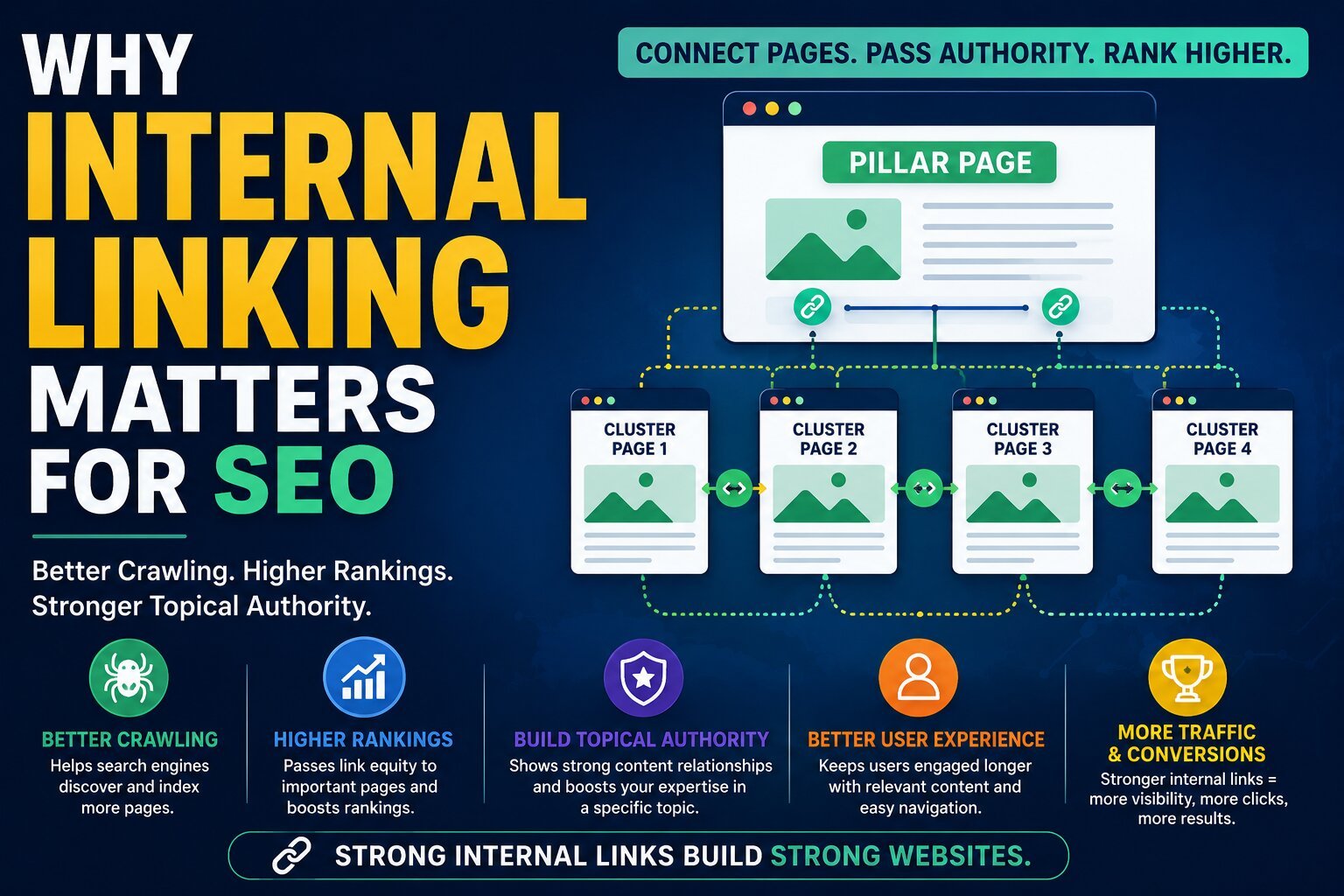
Google increasingly ranks topics, not just individual keywords. A site that comprehensively covers a subject — and clearly shows how its pages relate to one another — is far more likely to be seen as an authority than a site with scattered, disconnected articles.
This is where topic clusters, pillar pages, and semantic relationships come in:
- A pillar page covers a broad topic at a high level (e.g., “Content Marketing”).
- Cluster content covers subtopics in depth (e.g., “Content Calendars,” “Content Repurposing,” “Content Distribution”).
- Internal links tie the cluster pages back to the pillar page, and the pillar links out to each cluster page.
This structure signals to search engines — and to AI systems — that your site has deep, organized expertise on a subject, not just a handful of disconnected posts.
4. Improves User Experience
Internal linking isn’t just for bots. It’s for people too.
- Easier navigation — users can find related content without hunting through menus
- Higher engagement — visitors read more pages per session when relevant links are offered
- Lower bounce rates — instead of leaving after one article, users click through to the next relevant page
Google has repeatedly emphasized that positive user engagement signals correlate with better rankings. Good internal linking directly supports that engagement.
5. Increases Page Rankings
Put it all together, and internal linking becomes a ranking lever in its own right:
- Strategic authority distribution boosts underperforming pages that deserve more visibility
- Supporting important pages with links from high-authority pages helps them rank faster
- A page that’s well-linked internally is treated as more relevant and trustworthy for its target topic
Many SEOs have seen pages jump in rankings simply by adding a handful of well-placed internal links from high-authority pages — no new content or backlinks required.
How Google Uses Internal Links
To understand why internal linking works, it helps to understand what’s happening under the hood.
- Googlebot crawling — Google’s crawler discovers new and updated pages by following internal links. More links to a page generally mean more frequent crawling.
- PageRank distribution — Google’s original ranking algorithm, PageRank, was built on the idea that links (including internal ones) pass authority between pages. While the algorithm has evolved, the core principle still applies.
- Contextual relevance — Google looks at the content surrounding a link to understand what the linked page is about.
- Anchor text understanding — the clickable text of a link (the anchor text) gives Google clues about the topic of the destination page. Descriptive anchor text like “internal linking best practices” is far more useful than “click here.”
- Entity relationships — Google’s systems increasingly understand content in terms of entities (people, places, concepts, products) and how they relate. Internal links help reinforce those relationships — for example, linking “email marketing” content to “marketing automation” content signals a real-world connection between the two topics.
Internal Linking and Topical Authority
Modern SEO isn’t about stuffing keywords into isolated pages. It’s about building semantic SEO — content structured around concepts and their relationships, not just exact-match phrases.
This is closely tied to how search engines use knowledge graphs: structured databases of entities and how they connect. A site that mirrors this structure through content hubs and topic clusters is easier for search engines to map onto their own understanding of a subject.
Here’s a simple visual example of how a pillar page structure works:
Pillar Page: "Internal Linking Guide"
│
├── Internal Linking Guide (pillar)
├── Anchor Text Guide
├── Topic Cluster Guide
├── Semantic SEO Guide
└── Topical Authority Guide
Each cluster page links back to the pillar, and the pillar links out to each cluster page. This creates a dense, interconnected web of relevant content — exactly what topical authority is built on.
Internal Linking vs. Backlinks
Both internal links and backlinks matter, but they play very different roles.
| Factor | Internal Links | Backlinks |
|---|---|---|
| Source | Your own website | Other websites |
| Control | Full control — add, edit, remove anytime | Little to no control |
| SEO Impact | Improves crawlability, authority flow, and topical structure | Builds domain-level authority and trust |
| Cost | Free — just editorial time | Often requires outreach, content, or budget |
| Authority Transfer | Distributes existing authority within the site | Brings new authority into the site |
| Ranking Influence | Strong for page-level relevance and structure | Strong for overall domain trust and competitiveness |
Why both matter: backlinks bring authority into your site, while internal links decide where that authority goes. A site with great backlinks but poor internal linking wastes much of that earned authority. A site with excellent internal linking but no backlinks will still struggle to compete in competitive niches. You need both working together.
Internal Linking for Pillar Pages
Pillar pages are only as strong as the internal links supporting them.
- Cluster content strategy — every piece of supporting content should link back to its pillar page, reinforcing the pillar’s topical relevance.
- Content hierarchy — pillar pages sit at the top, cluster pages beneath them, and any deeper supporting content beneath that.
- Topic relevance — links should only connect genuinely related content; forcing irrelevant links weakens the semantic signal instead of strengthening it.
Without this structure, even a well-written pillar page will struggle to rank, because it has no supporting network reinforcing its authority.
Internal Linking for E-commerce Websites
E-commerce sites have unique internal linking needs because of their scale and structure.
- Product pages should link to related products, complementary items, and their parent category.
- Category pages should link down to subcategories and top products, and up to broader category hubs.
- Collections (like “Summer Sale” or “Best Sellers”) create natural internal linking opportunities across otherwise unrelated products.
- Related products / “customers also bought” sections keep users browsing and spread authority across the catalog.
Example: An online shoe store might link a specific sneaker’s product page to the “Men’s Running Shoes” category page, a “Best Running Shoes for Beginners” blog post, and a few related sneaker models. This keeps authority flowing to deep product pages that would otherwise be buried and hard to discover.
Internal Linking for Local SEO
Local businesses can use internal linking to reinforce geographic and service relevance.
- Service pages (e.g., “Plumbing Repair”) should link to related services and to relevant location pages.
- Location pages (e.g., “Plumbing Services in Austin, TX”) should link back to the core service pages and to other nearby location pages if the business serves multiple areas.
- Google Business Profile support — while GBP itself doesn’t accept internal links, a well-linked website reinforces the information and relevance signals that support your local listings.
- Local relevance signals — linking location and service pages together helps search engines understand exactly which areas and services your business covers.
Internal Linking and AI Search Optimization
This is where internal linking becomes critical for 2026 and beyond.
AI-powered systems — Google AI Overviews, ChatGPT, Gemini, and Perplexity — don’t just look at individual pages in isolation. They try to understand a website’s overall expertise on a topic, often by evaluating how comprehensively and coherently a site covers a subject.
Strong internal linking helps these systems:
- Identify which pages on your site are most authoritative on a given topic
- Understand the relationships between related concepts (which supports how your content gets summarized or cited)
- Recognize topical depth, which matters when AI systems are choosing which sources to reference in generated answers
- Group related content together, making it easier to extract clear, structured answers for search snippets and AI-generated summaries
In short, a site organized around clear topic clusters, with strong internal links, is easier for AI systems to understand and more likely to be surfaced as a trusted source — whether that’s in a traditional search result, an AI Overview, or a conversational AI answer.
Best Internal Linking Strategies for 2026
- Contextual links — links placed naturally within body content are more valuable than links buried in footers or sidebars
- Topic clusters — organize content around pillar and cluster pages
- Hub-and-spoke model — a central hub page links out to and receives links from multiple related spoke pages
- Pillar page linking — ensure every pillar page is both linked to and links out to its cluster content
- Breadcrumb navigation — helps both users and search engines understand site hierarchy
- Related content sections — automated or manually curated “you might also like” sections keep users engaged and spread link equity
- HTML sitemaps — a human-readable sitemap page can help search engines find pages that might otherwise be hard to reach
- Strategic anchor text — use descriptive, varied anchor text that reflects the destination page’s topic, avoiding generic phrases like “click here”
Internal Linking Best Practices
| Best Practice | Why It Matters |
|---|---|
| Use descriptive anchor text | Helps search engines and users understand what the linked page is about |
| Link to important pages | Ensures your highest-value pages receive the most internal authority |
| Avoid orphan pages | Prevents pages from being invisible to crawlers and users |
| Update old content | Keeps internal links current and connects new content to existing authority |
| Use contextual links | Links within body content carry more relevance signal than navigation links |
| Maintain logical structure | Makes it easier for both users and search engines to understand site hierarchy |
Common Internal Linking Mistakes
- Orphan pages — pages with no internal links pointing to them, making them hard to discover
- Too many links — overloading a page with links dilutes the value passed to each one and can overwhelm users
- Generic anchor text — phrases like “click here” or “read more” waste an opportunity to reinforce topical relevance
- Broken links — internal links pointing to deleted or moved pages waste crawl budget and frustrate users
- Irrelevant links — linking unrelated content weakens topical signals rather than strengthening them
- Ignoring old content — failing to update older posts with links to newer, relevant content leaves authority trapped in outdated pages
How to Audit Internal Links
A regular internal linking audit keeps your site structure healthy. Here’s a simple step-by-step process:
- Crawl the website using a crawling tool to map every page and every internal link.
- Find orphan pages — pages with zero internal links pointing to them.
- Analyze internal link depth — check how many clicks it takes to reach each page from the homepage; important pages should be no more than 2–3 clicks deep.
- Check anchor text — look for generic or repetitive anchor text that could be more descriptive.
- Improve content relationships — identify related pages that aren’t yet linked to one another and add contextual links.
- Fix broken links — locate and repair or remove any internal links pointing to dead pages.
Helpful tools for this process include Screaming Frog, Ahrefs, Semrush, and Google Search Console — each offers reports on internal link counts, orphan pages, and crawl depth.
Real-World Examples
- SEO websites often build a pillar page like “SEO Guide” surrounded by cluster pages on keyword research, on-page SEO, and technical SEO — all interlinked to demonstrate comprehensive topical coverage.
- SaaS businesses frequently link blog content to relevant feature pages, turning educational content into a path toward product pages without being overly promotional.
- E-commerce stores use category-to-product and product-to-product linking to keep shoppers browsing and to spread authority to deep catalog pages.
- Local businesses connect service pages to location pages, reinforcing exactly which services are offered where.
- News websites link related articles and topic tags together, helping readers (and search engines) follow ongoing stories and topic coverage over time.
Advanced Internal Linking Techniques
- Reverse siloing — instead of only linking downward from pillar to cluster pages, cluster pages also link back up and across to reinforce the entire topic network
- Topic clustering — systematically grouping related content and ensuring dense internal linking within each cluster
- Semantic linking — linking based on conceptual relationships, not just exact keyword matches
- Entity optimization — using internal links to reinforce relationships between named entities your content covers
- Strategic authority passing — deliberately routing internal links from high-authority pages toward pages that need a ranking boost
Expert Recommendations
- Building topical authority: commit to a pillar-and-cluster content model, and revisit it quarterly to fill gaps and strengthen weak links.
- Increasing rankings: audit your top-performing pages and ensure they link to underperforming pages that target closely related keywords.
- Improving crawl efficiency: reduce reliance on JavaScript-only navigation and ensure critical pages are reachable through plain HTML links.
- Preparing for AI search: structure content clearly around topics and subtopics, with consistent internal linking, so AI systems can easily map your site’s expertise.
FAQ Section
1. What is internal linking in SEO?
Internal linking is the practice of connecting pages on the same website through hyperlinks, helping both search engines and users navigate and understand the relationships between content.
2. How many internal links should a page have?
There’s no fixed number, but most SEOs recommend a natural, reader-friendly amount — often somewhere between 3 and 10 contextual links per page, depending on content length and depth.
3. Do internal links improve rankings?
Yes. They help distribute authority to important pages, reinforce topical relevance, and improve crawlability — all of which support better rankings.
4. Can internal links help index pages faster?
Yes. Pages that are well-linked internally are discovered and crawled more quickly than orphan pages with no internal links pointing to them.
5. What is an orphan page?
An orphan page is a page with no internal links pointing to it, making it difficult or impossible for search engines and users to discover through normal site navigation.
6. Are internal links important for topical authority?
Absolutely. Internal links connect related content into clusters, showing search engines that a site comprehensively covers a topic rather than offering scattered, disconnected pages.
7. Do AI search engines use internal links?
Yes. AI systems like Google AI Overviews, ChatGPT, Gemini, and Perplexity benefit from clear internal linking structures, which help them understand topic relationships and identify authoritative, well-organized sources.
8. What’s the difference between internal links and backlinks?
Internal links connect pages within the same website and are fully within your control. Backlinks come from other websites and bring external authority into your site.
9. Should I use exact-match anchor text for internal links?
Descriptive, natural anchor text is best. Exact-match anchor text used excessively can look manipulative; varied, relevant phrasing is safer and more useful for readers.
10. How often should I audit my internal links?
A quarterly audit is a good baseline for most websites, with more frequent checks for large sites that publish content regularly.
Conclusion
Internal linking remains one of the most powerful — and most underutilized — SEO strategies available in 2026. It costs nothing but time, it’s entirely within your control, and it directly influences how search engines crawl your site, how authority flows between your pages, and how clearly your topical expertise comes across.
Beyond traditional rankings, internal linking is now a critical factor in AI search visibility. As AI Overviews, ChatGPT, Gemini, and Perplexity increasingly shape how people find information, a well-structured internal linking strategy helps these systems understand your content’s relationships and recognize your site as a trustworthy, authoritative source.
If you take one action after reading this article, let it be this: audit your site’s internal links this week. Find your orphan pages, strengthen your pillar-and-cluster structure, and make sure your most important pages are getting the internal authority they deserve. It’s a simple change — but it might be the single highest-leverage SEO improvement you make all year.